A form builder that pushes every answer to your phone.
Build a form in the dashboard, publish it at its own link or embed it on your site, and read the answers on your phone seconds later — not in an inbox you check twice a day.
Everything between the field and your lock screen
A form is only useful if you notice it was filled in. Pocket Alert builds the form and delivers the answer to the one device you always have on you.
Submissions become notifications
The answers arrive as a push on Android and iOS, seconds after someone hits send. No inbox to watch, no spam folder to lose them in.
17 field types, no code
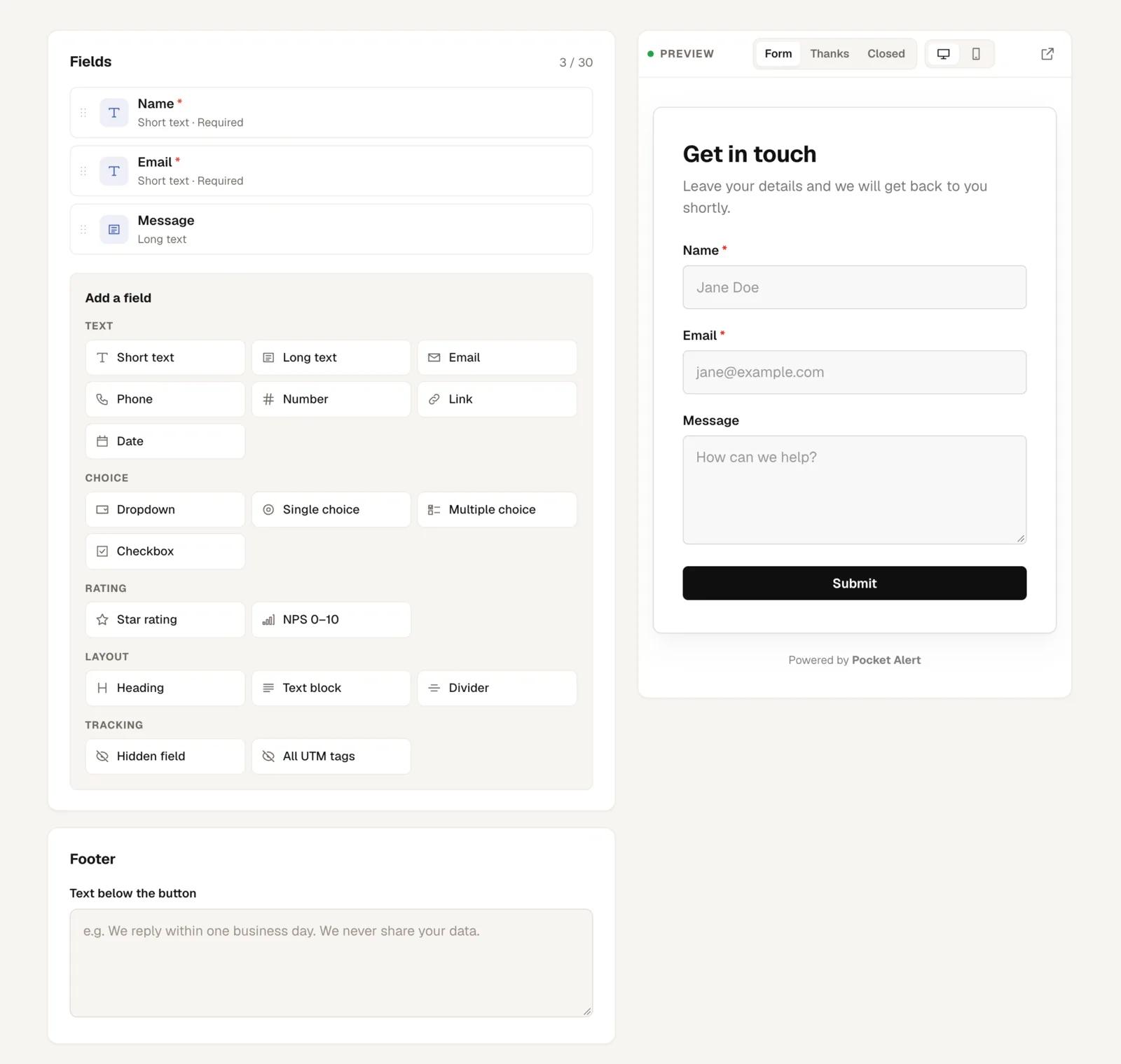
Short text, long text, email, phone, number, URL, date, dropdown, radio, checkboxes, consent, star rating, NPS, plus headings and dividers.
Styled to match your brand
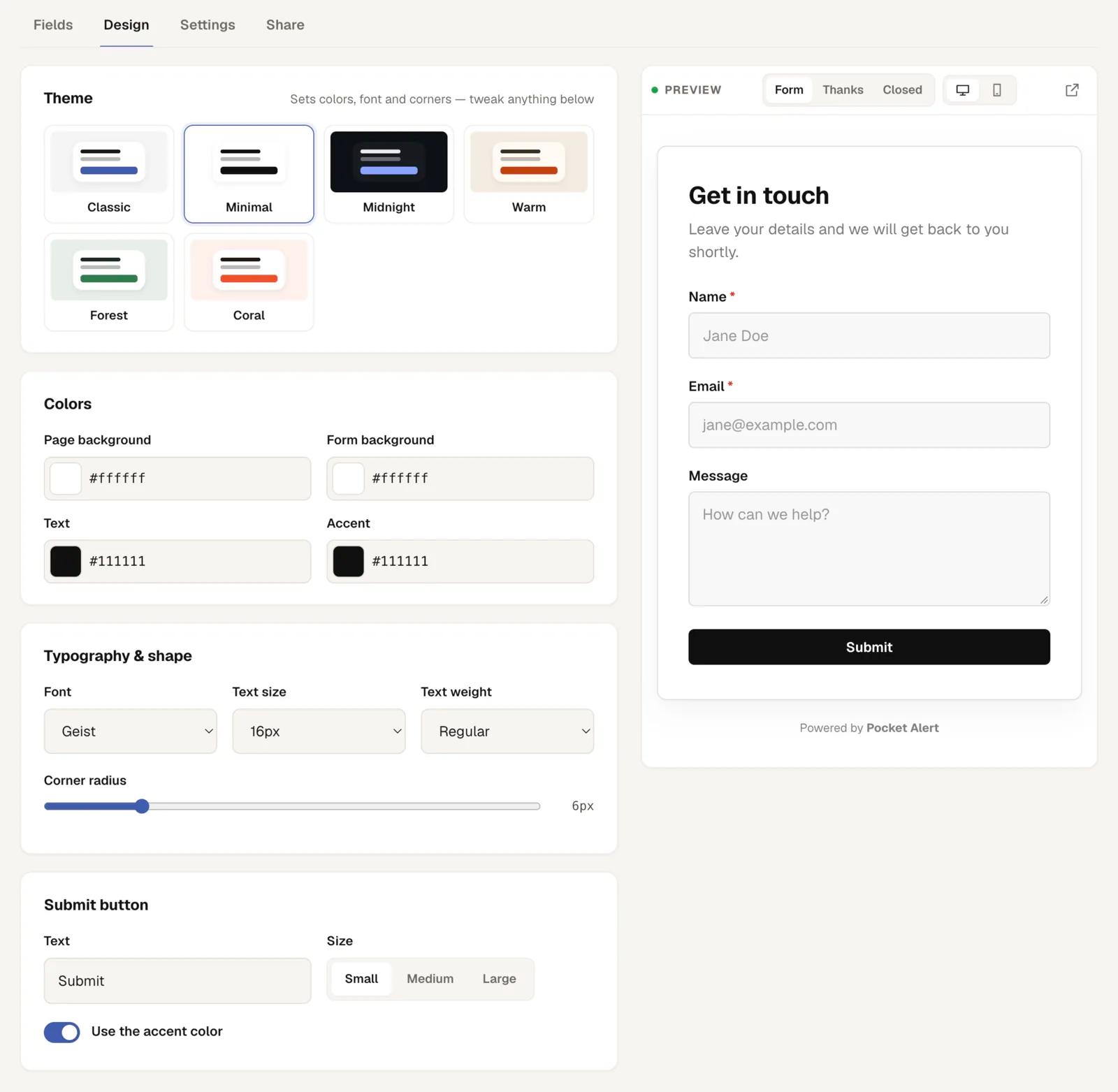
Six themes to start from, then your own colours, 42 Google Fonts, sizes and corner radius. The form looks like your site, not like a form tool.
Embed it or share the link
Paste two lines and the form sits inside your page, resizing itself. Or share the link or QR code and skip the website entirely.
Campaign tracking built in
Hidden fields pick up utm_source and friends from the page URL, so every notification tells you which campaign produced the lead.
You decide where it runs
Limit which domains may embed it, cap responses, set a closing date. A honeypot and rate limits keep bots out without a CAPTCHA.
The builder, end to end
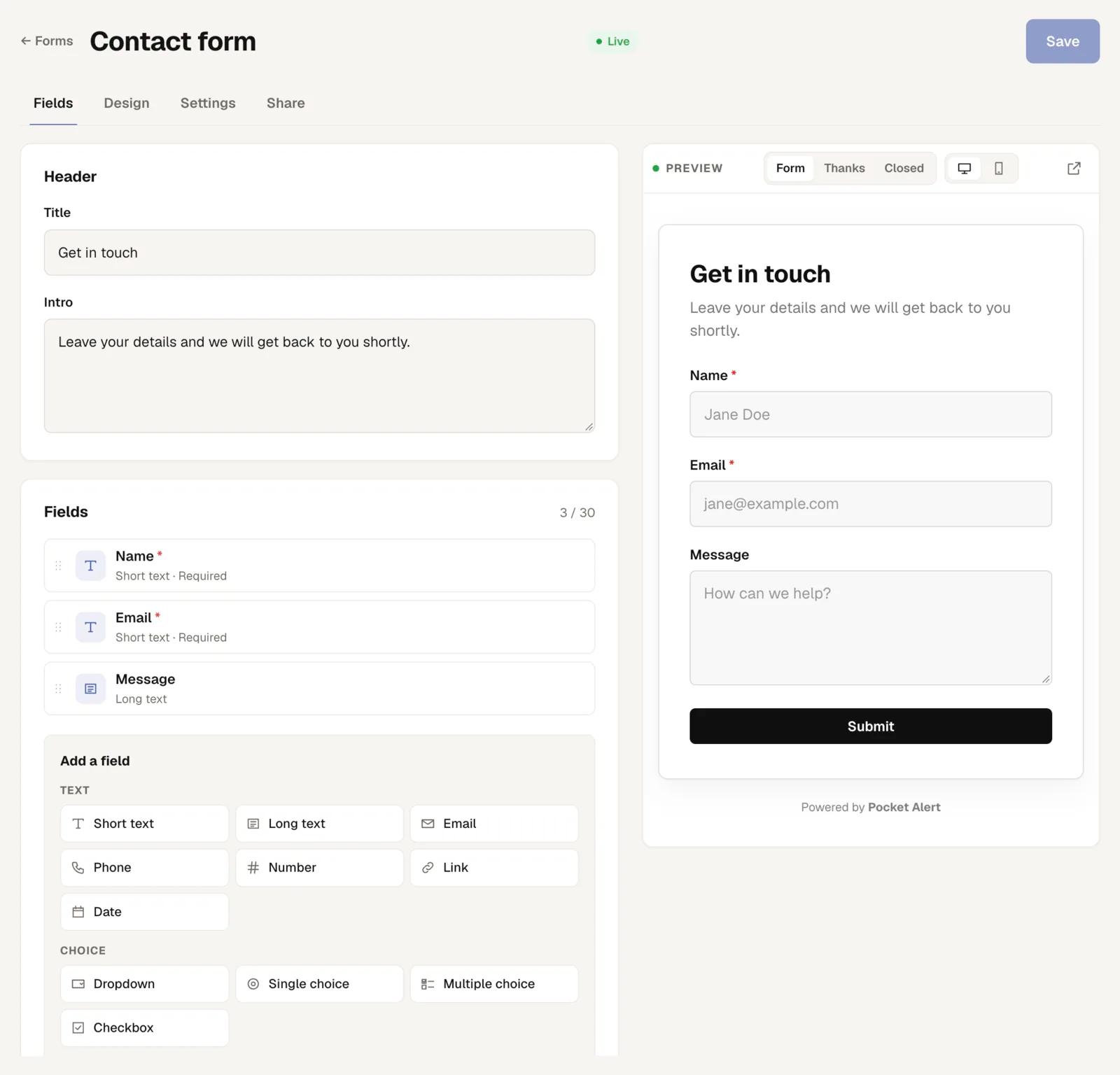
One screen: the editor on the left, the form exactly as visitors will see it on the right. No publish-and-refresh loop.
Three steps to a form that alerts you
Build the form
Pick fields from the palette, write the labels, style it to match your site. The preview updates as you type.
Publish it
Share the public link or QR code, or paste the embed snippet into your page. Nothing to host, nothing to deploy.
Get the push
Someone fills it in, your phone buzzes with the answers. Route it to a chosen app or device, or mark it critical.
How the form builder works
You add fields from a palette, drag them into order, write the labels and mark what is required. A live preview sits beside the editor, and clicking a field in the preview opens it for editing. Save, and the form is published on its own domain — frms.click/<id> — with a QR code generated for it.
Nothing is hosted on your side. The form runs on Pocket Alert, so there is no page to deploy, no endpoint to write and no form-handling service to wire up.
From submit to your lock screen
A submission becomes a message on your account, exactly as an incoming webhook does. The answers make up the body in the order the fields appear; hidden values, the visitor's IP and the timestamp sit underneath. Message content is encrypted at rest with your personal key.
Because it is an ordinary message, everything you already use applies: route the form to a specific application or device, give it a priority level from silent to critical, and read the full history in the dashboard or through the API.
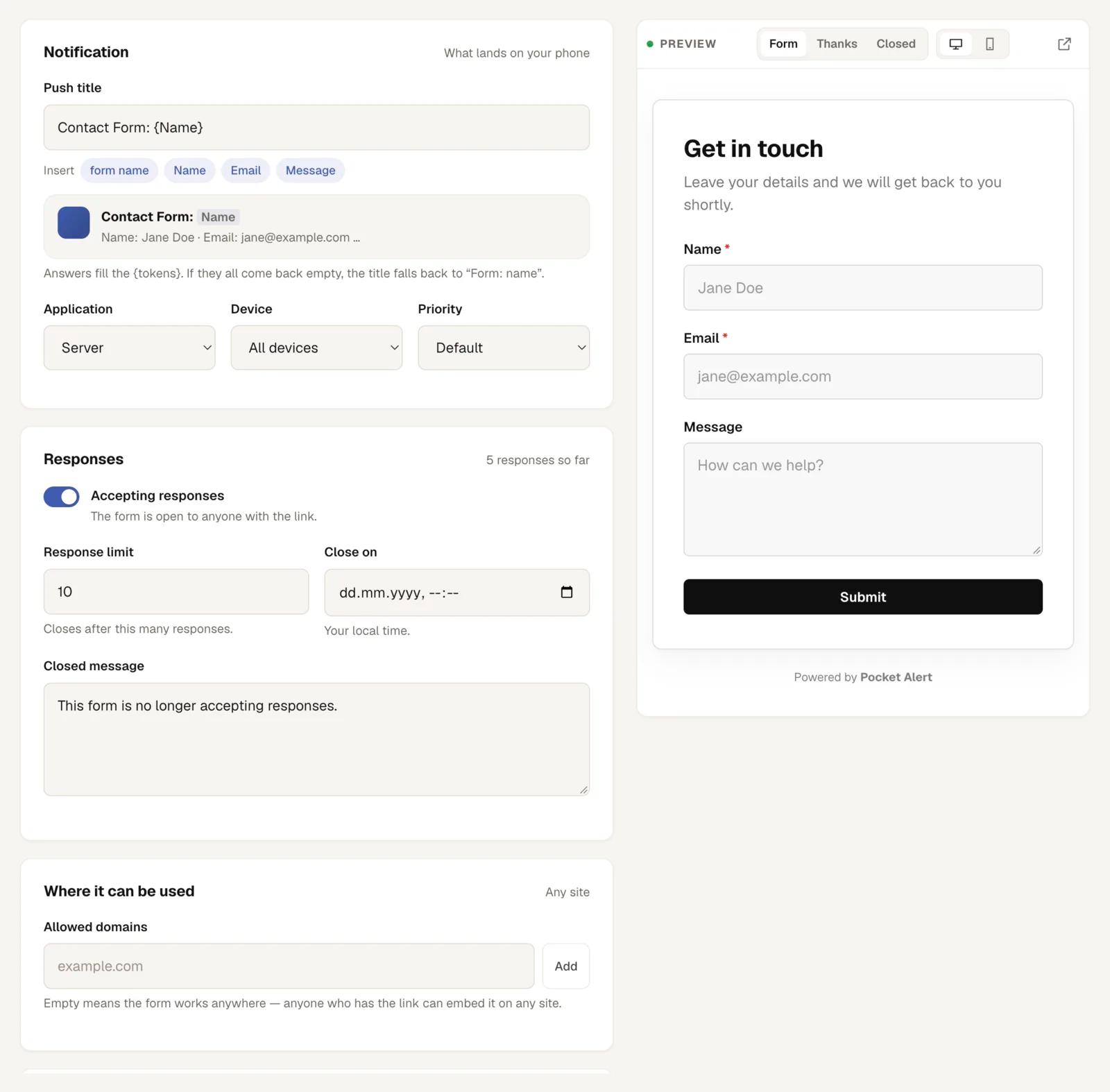
The push title is yours to write. A template like New lead: {Name} ({Email}) fills its tokens from the answers, so the notification is useful before you open it. Answers that come back empty drop out of the title.
Email notifications versus push
Most form tools tell you about a submission by email, and that is where the trouble starts: the notification lands in a folder full of other mail, it can be filtered as spam, and on a phone it competes with everything else in the inbox. People find out hours later that a demo request came in.
A push notification has none of that in the way. It appears on the lock screen with the answers already visible, it can be routed to one device, and a form marked critical rings through Do Not Disturb. That is the whole argument for building the form here rather than in Google Forms, Typeform, Tally or Jotform — not that this builder is deeper than theirs, but that the answer reaches you immediately.
If you already have a form in one of those tools and only want the alerting part, keep it and point its webhook at Pocket Alert instead: that is covered on form submission alerts.
Embedding it on your site
Two lines put the form inside your page:
<div data-pocketalert-form="your-form-id"></div>
<script src="https://frms.click/embed/form.js" async></script>
The iframe reports its own height, so the form grows and shrinks with its content instead of scrolling inside a fixed box. The URL parameters of the host page are handed to the form's hidden fields, which is how utm_source, utm_campaign or your own plan=pro end up in the notification. After a response the container fires a pocketalert:submit event for your analytics.
Keeping it clean
A honeypot field catches crawlers that fill in everything they find — they get a success screen and nothing is delivered. Rate limits cap one IP at 10 submissions a minute, and a single form at 60 a minute and 300 an hour. Visitors never see a CAPTCHA.
The link to a form is public, so by default it can be embedded anywhere. Listing your domains in the settings closes that: only those sites can frame the form, submissions from anywhere else are refused, and the site a response came from is recorded in the message next to the IP.
You can cap the total number of responses, set a closing date and time, or switch the form off. Once closed it shows the message you wrote and refuses submissions server-side, so a stale link cannot keep collecting answers.
What it does not do
No file uploads, no payments, no conditional logic that hides one question based on another. If you need signed contracts or a checkout, this is the wrong tool. If you need to know, right now, that somebody asked for a quote, it is the right one.
What it costs
One live form on the free plan, ten on Starter, thirty on Medium and no limit on Large. Responses are not billed separately — a submission uses one message from your daily allowance, which is 50 a day even on the free plan. Full numbers are on the pricing page.
Questions, answered
Build the form in Pocket Alert instead of pointing it at an inbox. Every submission is delivered to the Pocket Alert app on your Android or iOS phone as a push notification, with the answers inside the notification. There is no email step, no filter to set up and no automation tool in between.
Normally within a second or two. The submission becomes a message on your account and goes out over the same push infrastructure as everything else Pocket Alert sends, so it behaves like any other alert — including on the lock screen, on a watch, and with Do Not Disturb bypassed when you mark the form critical.
Yes — the push has to land somewhere, so install the free Pocket Alert app for Android or iOS and sign in. Your visitors install nothing: they see a normal web page. You can also read submissions in the web dashboard if you would rather not use the app.
Both. Every form gets a public link and a QR code that work on their own, and the Share tab also gives you a two-line embed snippet. The embedded form resizes itself to its content instead of scrolling inside a fixed box, and it passes the host page’s URL parameters into your hidden fields.
Yes. Write a title template such as New lead: {Name} ({Email}) and the tokens are filled from the answers, so the notification is useful before you open it. Tokens reference fields by their label, empty answers drop out, and the template stays private — it never appears on the public form.
Short text, long text, email, phone, number, URL, date, dropdown, radio buttons, checkboxes, a single consent checkbox, a 1–5 star rating and a 0–10 NPS question, plus headings, paragraphs, dividers and hidden fields — 30 fields per form. File uploads, payments and conditional logic are not supported; for those, a dedicated form platform is the better tool.
A hidden honeypot field catches automated fills: the bot gets an ordinary success screen and nothing is delivered to you. On top of that, one IP is capped at 10 submissions a minute, and a single form at 60 a minute and 300 an hour. Your visitors never see a CAPTCHA, and public form pages are marked noindex.
List them in the form settings. Only the domains you list can embed the form, submissions coming from anywhere else are refused, and every response records the site it came from. Leave the list empty and the form works anywhere, which is what you want for a link in a bio or a QR code on a poster.
Both. Set a maximum number of responses, a closing date and time, or switch the form off by hand. After that visitors see the closing message you wrote, and submissions are refused on the server — useful for limited signups, giveaways and RSVP links that keep circulating after the event.
Your next lead should ring, not sit in an inbox
One form is free forever. Build it in a minute, put the link in your bio or on your site, and find out the moment someone fills it in.