Push notifications, from your terminal.
Send alerts from scripts, cron jobs and CI/CD, or browse your inbox in a full-screen terminal UI. One static binary, zero dependencies.
# Fire a notification from anywhere
pocketalert send "Deploy finished" "v2.4.0 is live 🚀"
✓ Sent

# Critical alert with buttons — gets through Do Not Disturb
pocketalert send "Deploy failed" "main@4f2c" -l critical \
  --action "view:Open logs:https://ci.example.com/run/1" \
--action "http:Retry:https://ci.example.com/run/1/retry"The whole API, one command away
Everything Pocket Alert does, wired into the tools you already live in — your shell, your scripts, your pipelines.
Interactive mode
Run pocketalert ui for a full-screen inbox: search, read, compose with levels and buttons, and manage apps, devices and webhooks.
Scriptable by design
Drop notifications into any script, Makefile, or one-liner. No browser, no dashboard — just your shell.
Cross-platform
Single static binary for Linux, macOS (Intel & Apple Silicon), and Windows. No runtime, no dependencies.
Built for CI/CD
Wire alerts into GitHub Actions, GitLab CI, Jenkins, or any pipeline. Authenticate once, send everywhere.
Full API access
Priority levels up to critical, action buttons, image attachments, and scheduled delivery with --at or --in.
Know when jobs finish
Wrap any command with pocketalert exec and get a push with the exit code, duration, and last lines of output.
Secure by default
API key entered at a hidden prompt, stored with 600 perms, or passed as POCKETALERT_API_KEY in CI.
Sub-second delivery
Push hits your phone in under a second. Perfect for monitoring scripts, deploys, and system alerts.
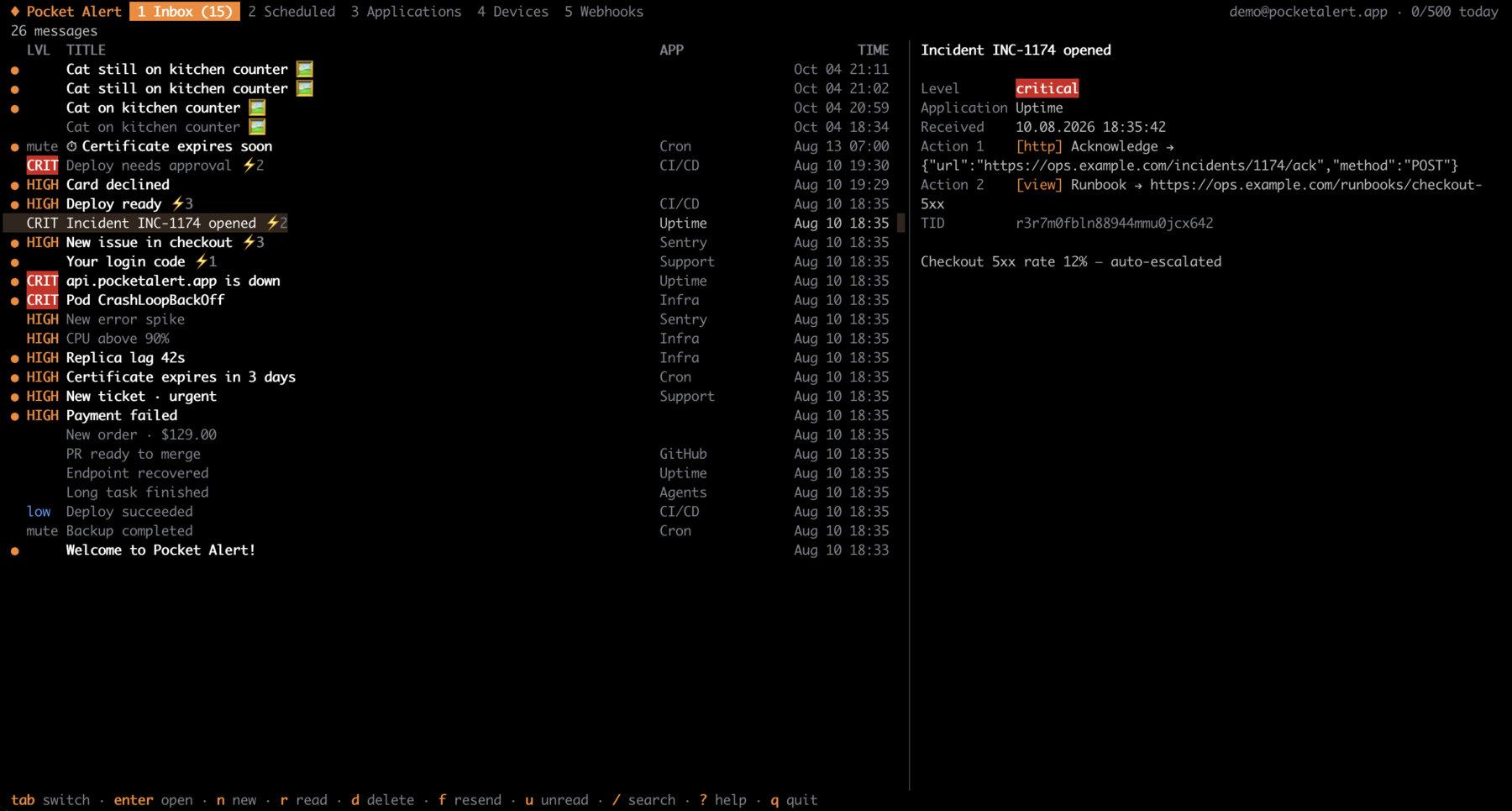
Your inbox, in the terminal
Run pocketalert ui to search and read messages, compose new ones with levels, schedules and action buttons, and manage applications, devices and webhooks — without leaving the keyboard.
Three steps to your first push
Install the CLI
Run the one-line installer, use Homebrew, or download the binary for your platform below.
Authenticate
Run pocketalert auth once and paste your API key. In CI, set POCKETALERT_API_KEY instead.
Send your first push
Fire pocketalert send "Title" "Message" — your phone buzzes a moment later.
Download your binary
Pick your platform and architecture — pre-built, ready to drop into your PATH.
All releases, checksums and source code on GitHub.
Installation
Linux / macOS
curl -fsSL https://raw.githubusercontent.com/PocketAlert/cli/main/install.sh | shOr with Homebrew:
brew install pocketalert/tap/pocketalertThe script checks the SHA-256 checksum. To pin a version, set POCKETALERT_VERSION=v2.1.0.
Windows
Unzip the archive and add the folder with pocketalert.exe to your PATH environment variable.
Go
go install github.com/PocketAlert/cli/cmd/pocketalert@latestThen verify it works by running pocketalert version.
Quick start
1. Authenticate
pocketalert authGet your API key from API Keys. It is stored securely in ~/.pocketalert/config.json.
2. Send a notification
pocketalert send "Hello" "It works 🎉"In CI and containers, skip auth and set POCKETALERT_API_KEY instead.
Examples
Levels, buttons and images
pocketalert send "Disk 95%" "/var is almost full" --level high
pocketalert send "Deploy failed" "main@4f2c" -l critical \
  --action "view:Open logs:https://ci.example.com/run/1" \
  --action "http:Retry:https://ci.example.com/run/1/retry" \
  --action "copy:Copy SHA:4f2c9e1"
pocketalert send "Grafana" "CPU spike" --image ./panel.png
Levels run from silent to critical. Button types are view (open a URL), http (call a webhook) and copy, up to three per message.
Pipe a message in
df -h | pocketalert send "Disk report"
pocketalert send -t "AI summary" -m "$SUMMARY"      # safe for text that starts with "-"
Schedule delivery
pocketalert send "Standup" "In 10 minutes" --at "2026-10-20 09:50"
pocketalert send "Reminder" "Rotate the keys" --in 1d12h
pocketalert scheduled list
pocketalert scheduled cancel <tid>
Get notified when a command finishes
pocketalert exec -- make release
pocketalert exec --on failure -l critical -- ./backup.sh
pocketalert exec -t "Nightly import" --tail 20 -- python import.py
You get a push with ✓ or ✗, the duration and the last lines of output. The exit code is passed through, so exec is safe in CI and set -e scripts.
Watch a log
tail -f app.log | grep --line-buffered ERROR | pocketalert watch -t "app errors"
journalctl -fu nginx | pocketalert watch --batch 1m -l high
Lines that arrive within --batch (5s by default) are grouped into one push, so a burst of errors costs one message from your daily quota.
Scripting
TID=$(pocketalert send "Build" "started" -q)       # print only the TID
pocketalert messages list --json | jq -r '.data[].title'
pocketalert usage                                   # today's quota
Every command accepts --json, errors go to stderr, and exit codes are reliable. Critical alerts, buttons, images and scheduling need a paid plan; on the free plan the message is still delivered and the CLI tells you what was left out.
For every command and flag — messages, applications, devices, webhooks, forms and API keys — see the full CLI documentation.
Questions, answered
Pocket Alert CLI is an open-source command-line tool that sends push notifications to your phone from scripts, cron jobs and CI. It can wrap a command and report when it finishes, turn log lines into alerts, and manage messages, applications, devices, webhooks, forms and API keys without a browser.
Yes. pocketalert ui opens a full-screen app in the terminal: browse and search the inbox, read messages with their action buttons, compose new ones with a level, schedule, image and buttons, and manage scheduled messages, applications, devices and webhooks. New messages appear on their own; press ? for all shortcuts.
After installing the CLI, run pocketalert auth and paste your API key at the prompt. Create your API key on the API Keys page. The CLI checks the key, then stores it in ~/.pocketalert/config.json. In CI, set POCKETALERT_API_KEY instead.
Pocket Alert CLI ships for Linux (AMD64 and ARM64), macOS (Intel and Apple Silicon), and Windows (AMD64). Pre-built binaries are provided for every supported platform.
Send one with pocketalert send "Title" "Message". Add --level critical, up to three --action buttons, an --image, or schedule it with --at / --in.
Absolutely — the CLI is built for CI/CD. Set POCKETALERT_API_KEY as a secret and call pocketalert send, or wrap a step with pocketalert exec -- make deploy to get its result on your phone.
No. Sending, exec, watch and interactive mode work on the free plan. The critical level, action buttons, images and scheduled delivery need a paid plan; on the free plan the message is still delivered and the CLI tells you what was left out.
Yes. The CLI stores your API key in ~/.pocketalert/config.json with file permissions 600, inside a config directory created with 700. All traffic goes over HTTPS, and the key is sent in the Token header.
Your terminal just got a notification channel
Download the binary, authenticate once, and send your first push from the terminal in under a minute.